Miley T.
★★★★★
“I was tired of logging into 6 different apps—Flixy just has everything I actually watch. Setup took minutes.”
18 days ago • Verified

Flixy upgrades any HDMI TV with instant access to top free apps and channels. Simple setup. One-time purchase. Full control over your media.
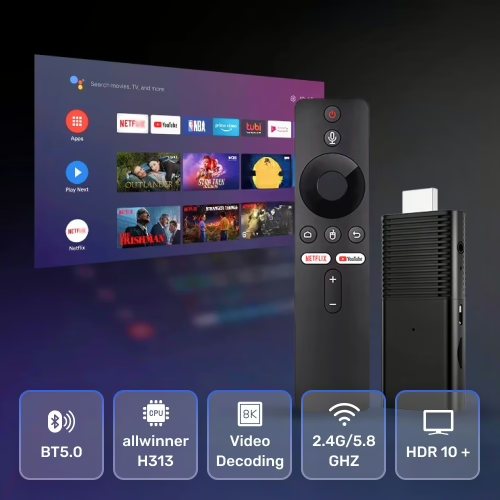
Designed for freedom and simplicity—enjoy more, pay less.
Easily find and stream content from popular free, ad-supported networks available on the app store.
Own your hardware. No rental fees or hidden device costs.
Stream, surf, mirror your screen, and play casual games on your TV.
Personalized shortcuts help you find what you love—faster.
Compatible with virtually any TV—no converters or extra remotes.
Keeps getting better—no manual installs required.
Consolidate your streaming. Flixy modernizes your TV experience with powerful hardware—and you only pay for the device once.
Set up once—enjoy forever.
Connect Flixy to your TV’s HDMI port and power via USB.
Switch to the HDMI input and join your home network.
Browse apps, channels, or the built-in browser. That’s it.
A complete entertainment solution without monthly costs.
| Feature | Flixy | Typical Streaming Device |
|---|---|---|
| Monthly Device Fees | None (one-time) | Often required |
| Open App Ecosystem | 1,000+ available | Limited selection |
| Smart Content Navigation | Included | Rare |
| Works with any HDMI TV | Yes | Varies |
| Screen mirroring | Yes | Limited |
| Automatic updates | Yes | Sometimes |
See what real customers say about setting up Flixy and cutting monthly costs.
“I was tired of logging into 6 different apps—Flixy just has everything I actually watch. Setup took minutes.”
“Guest room TV went from useless to the kids’ favorite spot. Screen mirroring is a lifesaver.”
“I haven’t touched my old remotes since installing Flixy. Saving money and getting more to watch.”
Quick answers before you get started.
No. Flixy is a one-time hardware purchase. You can use it to access free apps or your existing subscriptions without paying us a fee.
If your TV has an HDMI port, it’s compatible. Plug in the device, switch to the HDMI input, and connect to Wi-Fi.
Explore thousands of channels, apps, and popular shows that are freely available. You can also surf the web and mirror your screen.
Join thousands saving money and enjoying more with Flixy.
Note: Availability of specific channels/apps may vary by region.